How to make a A+ Bloodline livestock claim for a listing?
A+ Bloodlines is an industry-first product that officially connects commercial livestock listings to the stud genetics behind them. It is a verification system that allows stud producers to verify, protect and promote their brand across commercial listings on AuctionsPlus in real time, at scale.
Why A+ Bloodline matter to you as a Commercial Agent
A+ Bloodlines is the official verification of a commercial listing's bloodlines. It connects studs and commercial vendors on AuctionsPlus so that stud producers can protect their brand, commercial sellers can leverage the genetics they invest in, and buyers can purchase with confidence knowing what they are buying is verified. As a Commercial Agent (Assessor), you play a critical role in connecting your vendors' investment in quality genetics to the buyers who value it.
A+ Bloodline allows you to:
Highlight your vendor's breeding investment — Claiming A+ Bloodlinein your assessment directly promotes the value of the animals you're listing
Attract quality-driven bidders — Buyers can search and filter by A+ Bloodline, making your listings more discoverable to the right audience
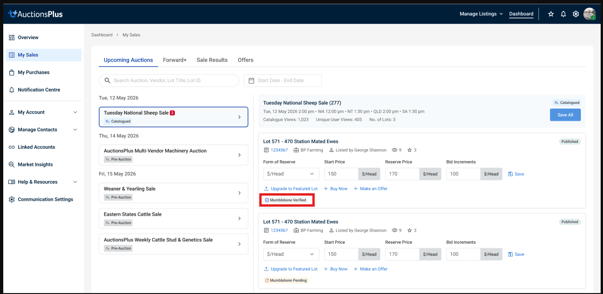
Build trust through stud verification — When a stud verifies your A+ Bloodline claim, a "Verified" badge appears on the listing, giving bidders greater confidence
Strengthen your vendor's relationship with their stud partner — Accurate A+ Bloodline claims connect your vendor back to the stud, reinforcing a quality partnership
This feature is available at no additional cost.
Step 1: Claiming an A+ Bloodline in Assessment Entry
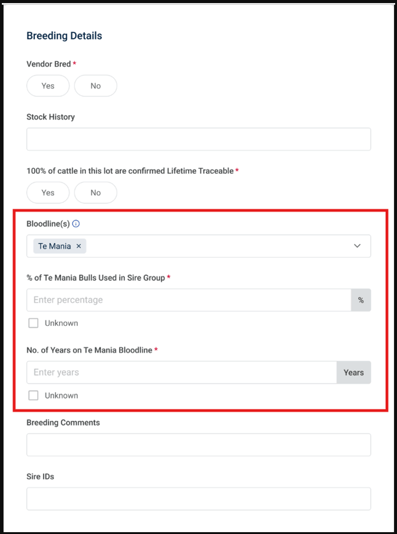
When completing an assessment, you will find the bloodline fields under the Breeding Details section of the animal history tab.
How to claim an A+ Bloodline:
Navigate to the Breeding Details section in the assessment entry form
Locate the Bloodline(s) field
Use the search/dropdown to find and select the stud bloodline name
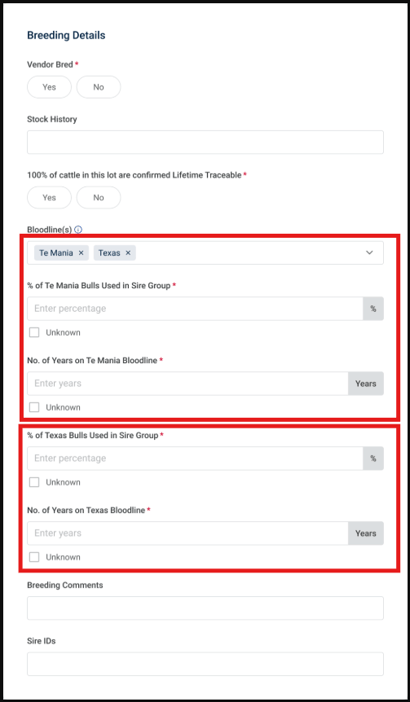
You can select more than oneA+ Bloodlineif applicable
Once a bloodline is selected, the following mandatory fields will appear:
% of stud's bulls/rams used in sire group — Enter the percentage or tick "Unknown"
Value must be greater than 0 and cannot exceed 100
If multiple bloodlines are claimed, percentages must add up to 100% or less
No. of years on stud bloodline — Enter the number of years (must be greater than 0)
Claiming multiple A+ Bloodline:
If your vendor uses genetics from more than one stud, you can add multiple A+ Bloodline. Each A+ Bloodlinewill require its own percentage and years fields.
Can't find an A+ Bloodline?
If the stud bloodline you need is not available in the dropdown, a prompt will direct you to contact the AuctionsPlus Customer Service Team at (02) 9262 4222.
Step 2: How A+ Bloodline appear to Buyers
Once you submit your assessment, the bloodline information you entered is displayed to buyers in two key places:
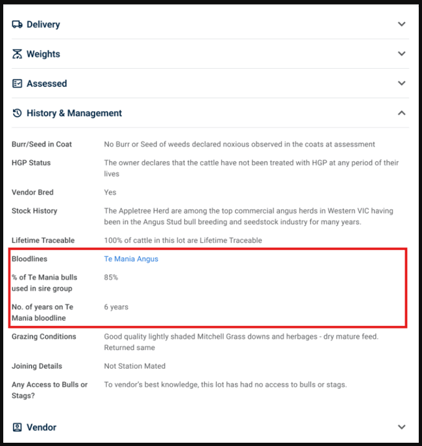
Lot Detail View — History & Management
Buyers can expand the History & Management section on a lot to view:
Bloodlines — The stud name (links to stud profile)
% of stud's bulls/rams used in sire group — e.g. 85%
No. of years on stud bloodline — e.g. 6 years
Search & Filter
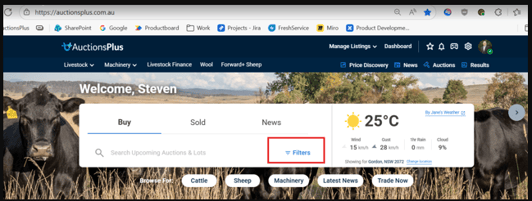
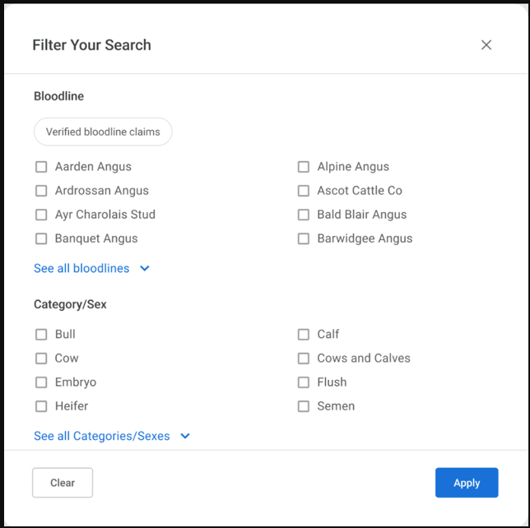
Buyers can discover your listings using the Bloodline filter, available from:
The Homepage search — via the "Filters" button
The Catalogue filter panel — within individual auction catalogues
Buyers can also toggle "Verified bloodline claims" to show only listings where the stud has confirmed the bloodline.
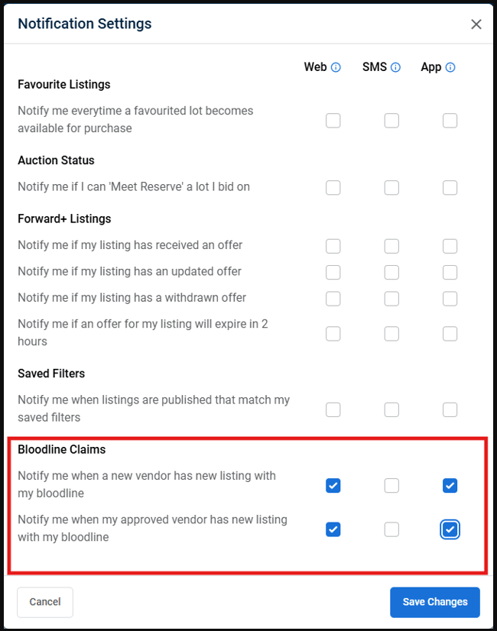
- Or open your AuctionsPlus Dashboard and navigate to Notification Settings
Select your Bloodline Notifications options - App (highly recommended)
Once activated, you will begin receiving notifications whenever the relevant Stud declines your bloodline claim in a livestock assessment.
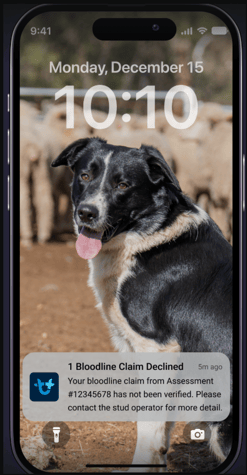
The notification will include:
A message: "Your bloodline claim has not been verified. Please contact the livestock stud for more detail"
The assessment/listing reference
The stud name
The stud operator's contact name and mobile number
— Mobile notification for "Bloodline Claim Declined"
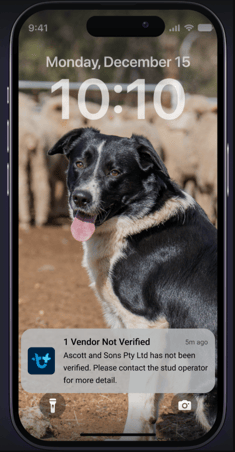
— Mobile notification for "Vendor Not Verified"
What to do if your claim is declined:
Contact the stud operator directly using the details in the notification
Check the bloodline details with your vendor to confirm accuracy
Re-submit the assessment with corrected information if needed
What if I bought my livestock from a secondary seller? A+ Bloodline verification explained
You've purchased cows from a commercial breeder who has used a particular stud's genetics. When you list them on AuctionsPlus, the stud may not recognise your name because you didn't buy direct from them. Here's how A+ Bloodlines handles this.
Your bloodline details always appear on your listing
The claim and the Verified badge are separate. Your agent can still select the stud bloodline in the assessment, and those details (stud name, % of sire group, years on bloodline) are always displayed to buyers and searchable in Bloodline filters. If the stud hasn't verified the claim, you simply won't display the Verified badge.
How to get verified when the stud doesn't know you:
Agent selects the Bloodline: Enter breeding comments and could include where/how you have come about the genetics. This will be seen by the Stud.
Your Agent can check the declined-claim notification: it includes the stud operator's name and mobile number.
Contact the stud, or ask your agent to: explain the connection, e.g. "These cows came from [vendor], who has bought your bulls for 15 years."
The stud approves you in the app: once approved, you stay on their approved vendor list for future listings. It's typically a one-time conversation.
Quick Reference
Action
Where
Key Detail
Claim an A+ Bloodline
Assessment Entry → Breeding Details → Bloodline(s) field
Select from dropdown; enter %, years, and optional sire IDs
Claim multiple A+ Bloodlines
Same field — add additional bloodlines
Percentages must total ≤ 100%
Bloodline not listed
Contact AuctionsPlus Customer Service
Phone: (02) 9262 4222
Declined claim notification
Mobile app / SMS / Platform
Contact the stud operator to resolve
Claim declined: stud doesn't know you
Mobile app / SMS / Platform
Contact the stud (details in your notification) or ask your agent to; explain the purchase history
Need Help?
For any questions about the Bloodlines feature, contact the AuctionsPlus Customer Service Team: